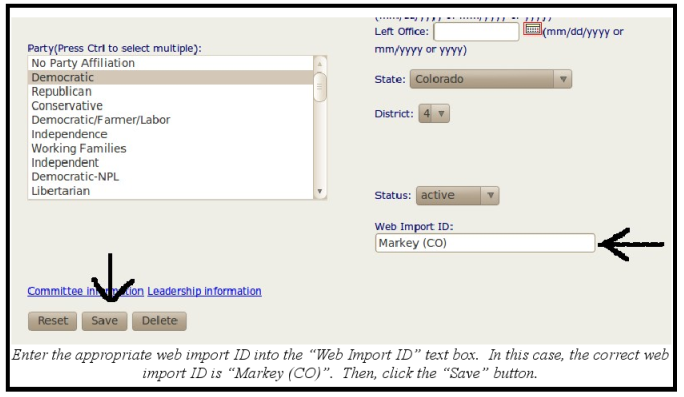
In addition to the roll call number, the web import ID for each member of Congress allows us to import votes directly into Admin. The web import ID is located under the "Offices" tab of each member of Congress' biographical entry in Admin. It must be noted that web import IDs are not the responsibility of the Key Votes Department. Rather, the Research Department is required to enter or amend the web import ID when adding or amending an office of a member of the House or Senate. However, sometimes they fail to add the web import ID, fail to update the web import ID, or incorrectly enter the web import ID. Generally, when this happens to a specific member of Congress, no vote will be imported for that member and they will be absent from the website. When you encounter this, it's best to notify the Research Department. Although, you may feel it's necessary to make the change yourself and re-import the votes so as to ensure that the votes are accurate as soon as possible.
The rule of thumb for web import IDs is to always reproduce verbatim what is on the vote breakdown. For members of the Senate, web import IDs follow this format: "[Last Name] ([Party Indication]-[State Abbreviation])". Here is an example of a vote breakdown:
- U.S. Congress - PN 1351-111 (Senate Confirmation Vote), 2010.
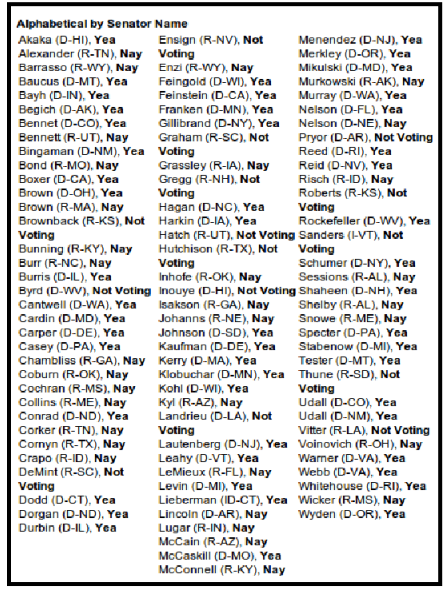
Therefore, if you were to enter the web import ID for Senator Joe Lieberman, you would type "Lieberman (ID-CT)".
For Representatives, the web import ID will typically be their last name. However, a sizable number of House members share a surname with one or more members of the same chamber. When this happens, the vast majority of the time, the web import ID will read as follows: "[Last Name] (State Abbreviation)]." Occasionally, there are members with the same surname as another member who represent districts within the same state. In such cases, the web import ID will typically read as follows: "[Last Name], [First Name]". Here is an example of a portion of a vote breakdown with an example of each:
- U.S. Congress - HR 3470 (House Passage), 2010.
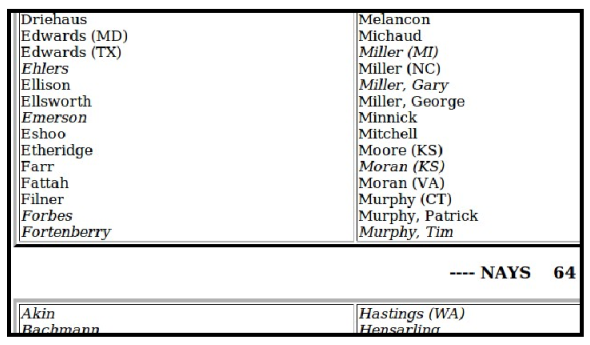
Therefore, based on the above vote breakdown, if you were to enter the web import ID for Representative Keith Ellison, you would type "Ellison." If you were to enter the web import ID for Representative Candice Miller of Michigan, you would type "Miller (NC)". If you were to enter the web import ID for Representative Patrick Murphy of Pennsylvania, you would type "Murphy, Patrick".
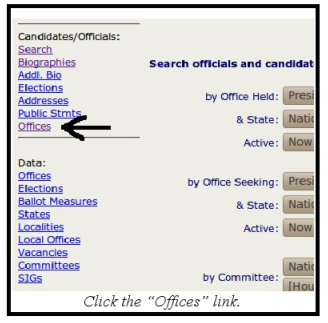
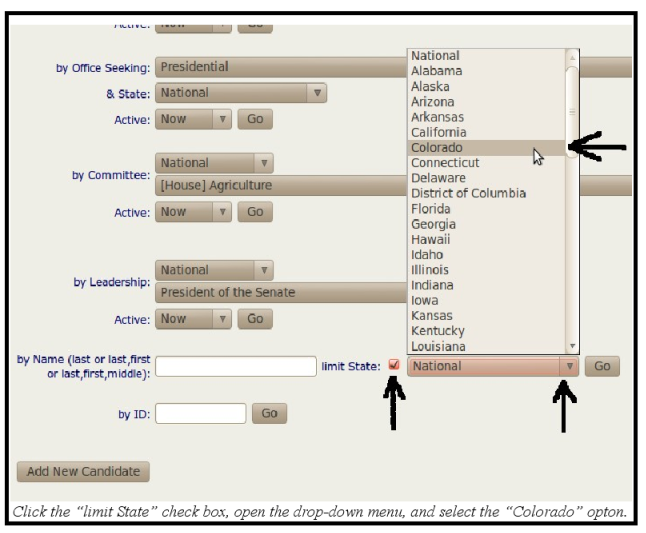
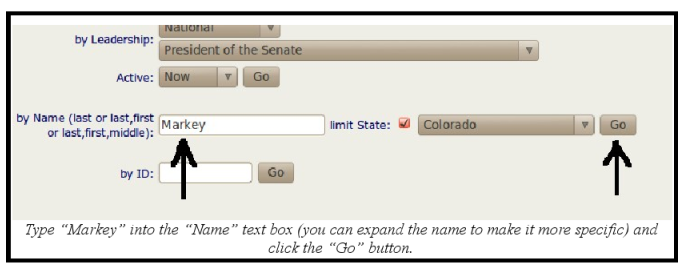
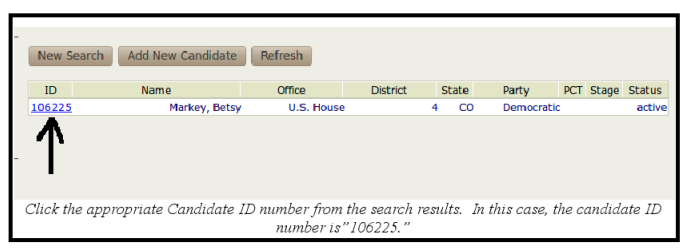
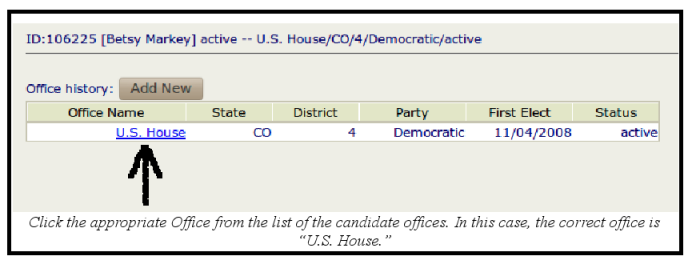
To access the web import ID text box, click the "Offices" link under the "Candidates/Officials" headline from the homepage of admin. Perform a state specific search for the official, and click the appropriate candidate ID from the list of search results. Here's an example:
- Rep. Betsy Markey of Colorado.
If you are required to correct the web import ID to remedy and error on the website, you still need to re-import the votes. Refer to the previous section for directions. Then, check to see if the correct vote has been assigned on the website.
Finally, web import IDs must be checked thoroughly after a new Congress convenes. The Constitution establishes January 3 as the date to convene, but Congress may amend that date. Therefore, in early January of every odd numbered year, web import IDs must be updated accordingly. Furthermore, anytime there is a special election for a member of the House or a Senator is appointed to fill a vacancy, the web import ID for that member must be updated accordingly. Although the Research Department is responsible for this, Key Votes must be attentive as to whether this responsibility was fulfilled.
