Amending Committee Actions in a Referred to Committee Status
At some point, you may want to amend committee actions within a referred to committee status. Generally, you will do this for the following reasons: (1) The Referred to Committee status is no longer needed because a vote has since occurred and you are changing the Referred to Committee status to vote status (if you don't remove the committee, it will remain on the website next to the status in the bill history); (2) A committee was added in the Committee Actions window but the "Referred to Committee" action was not selected; or (3) The wrong committee was selected and needs to be removed and a the correct committee needs to be added.
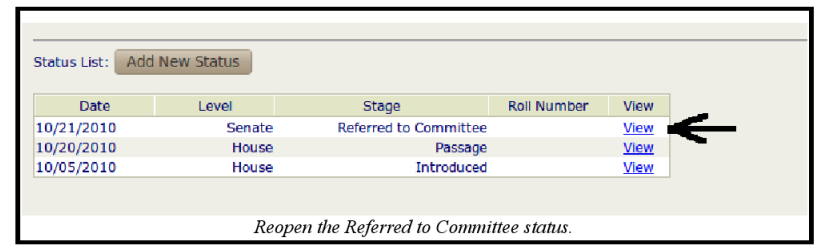
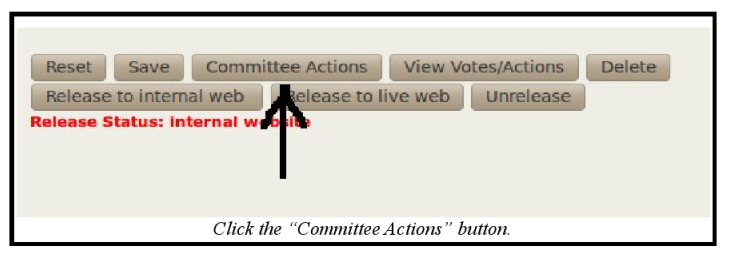
Amending committee actions in a Referred to Committee status is very similar to amending a committee sponsors. The only difference is that you click the "Committee Actions" button within the Referred to Committee status, as opposed to the "Committee Actions" button within the Introduced status. Here is an example:
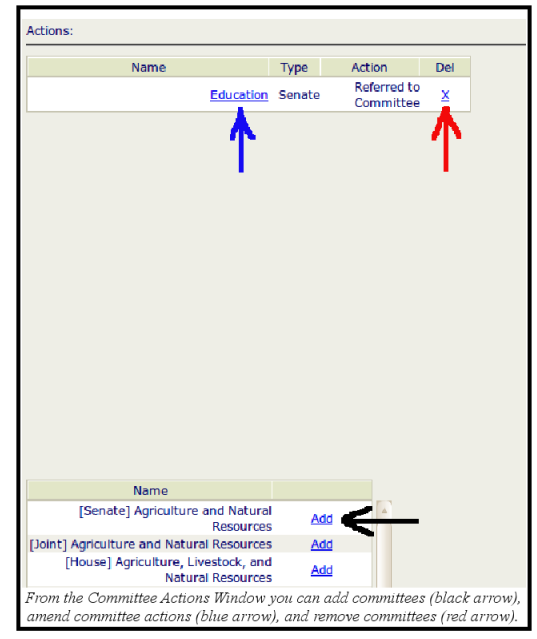
When adding committees, the default selection is "Sponsor." Always change that to "Referred to Committee." Like individual members in the Votes/Actions window, adding and deleting committees will automatically be saved, while amending the action requires you to click the "Save" button.
