Master Spreadsheet
The master spreadsheet is simply an organized list of all votes selected for that calendar year. State Key Votes and congressional Key Votes have their own sheet, or tab, in the spreadsheet. Each vote is assigned its own row, even if there are multiple votes for the same bill number. The spreadsheet should contain all of the following information:
Bill Information
- State^
- Bill Number
- Bill Description
Vote Information
- Stage (i.e. House Passage)
- Yeas
- Nays
- Date of Vote
- Roll Call Number
PVS Information
- Categories
- Date Vote Selected
- Reason for Selection
Vote Entering Information
- Initial (enterer name and date)
- First Check (checker name and date)^
- Second Check (checker name and date)^
- Staff Check/Release (staff member name and date)^
Summary Writing Information
- Initial (author name and date)
- First Check (checker name and date)
- Second Check (checker name and date)
- Staff Check/Release (staff member name and date)
Web Check Information
- Checker
- Date Checked
- Date Changes Implemented
Notes
^Not applicable for congressional bills
There should also be a color-coding system to indicate whether the vote has been released live, a summary has been written, or the summary has been released live. When votes are first selected, they are added to the spreadsheet without color. In this example, the color changes to green when the votes are released live (vote staff check), orange when a summary is written, and purple when the summary is released live. Finally, the color of the row is changed to bright blue when the vote is webchecked.
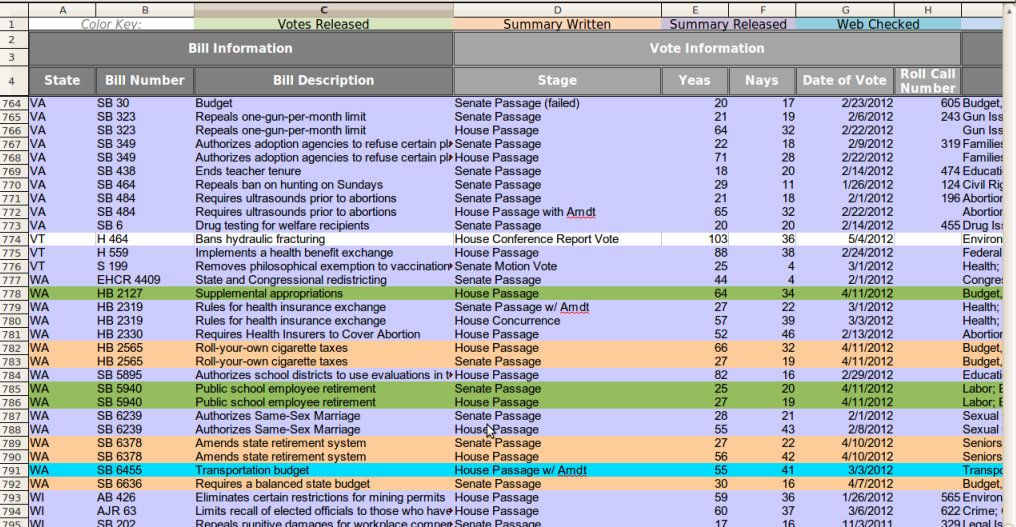
Staff should remember to update the spreadsheet as each vote moves through our internal processes - selection, vote live, summary written, summary live, and webcheck. Interns may view the spreadsheet but should not make any changes to it unless authorized by a staff member. The spreadsheet should be backed up on Webspace weekly by the Legislative Research Director. This will allow the National Director to review the spreadsheet, and ensure that the information is not lost if office computers are compromised.
