Select a Ballot Measure
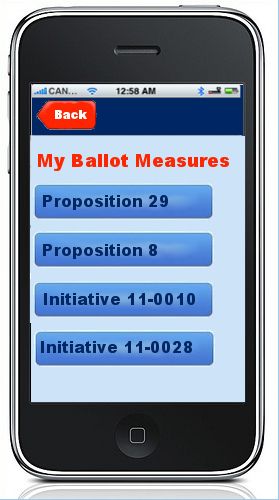
Transition: Tap a ballot measure, screen slides from right to left
Feedback:
Kristen:
Clinton:
Mike:
Luiz: Whatever overlay we use for Candidates, to identify what this page is, should be used here to display "My Ballot Measures". Change the display of the ballot measures into a list item with arrows (example).
Carly: n/a
Darren:
Chris L.:
Julia:
Detail for Sample Ballot Measure
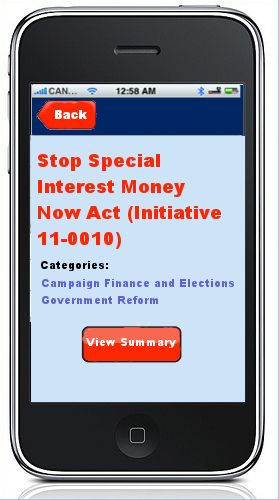
Transition: tap to select View Summary, screen slides from right to left
Feedback:
Kristen: user should have ability to save their preferred position, which would then appear on this page on the previous page
Clinton:
Mike:
Luiz: I think the normal text size would allow us to include the summary, if available, on this screen without the need for the user to click on any button.
Carly: I think users are not against having to scroll on an app page, it may be better if we just kept it all on the same page; they are obviously going to want to see the summary so why make them click again?
Darren:
Chris L.: As it stands now, Summaries are copy/pasted from the Secretary of State's office into admin. We can't really count on a standard length for these. It varies quite a bit from state to state. Same issue with titles. Copy/pasted from the SOS website typically and can get kind of wordy. We try and replicate the title as it will appear on the ballot.
Julia:
Go Back